
NuevaFlo changelog
Historial de cambios
Las últimas versiones y mejoras de NuevaFlo.
Al continuar, aceptas nuestros Términos y Política de privacidad.
Plantillas de Cargos
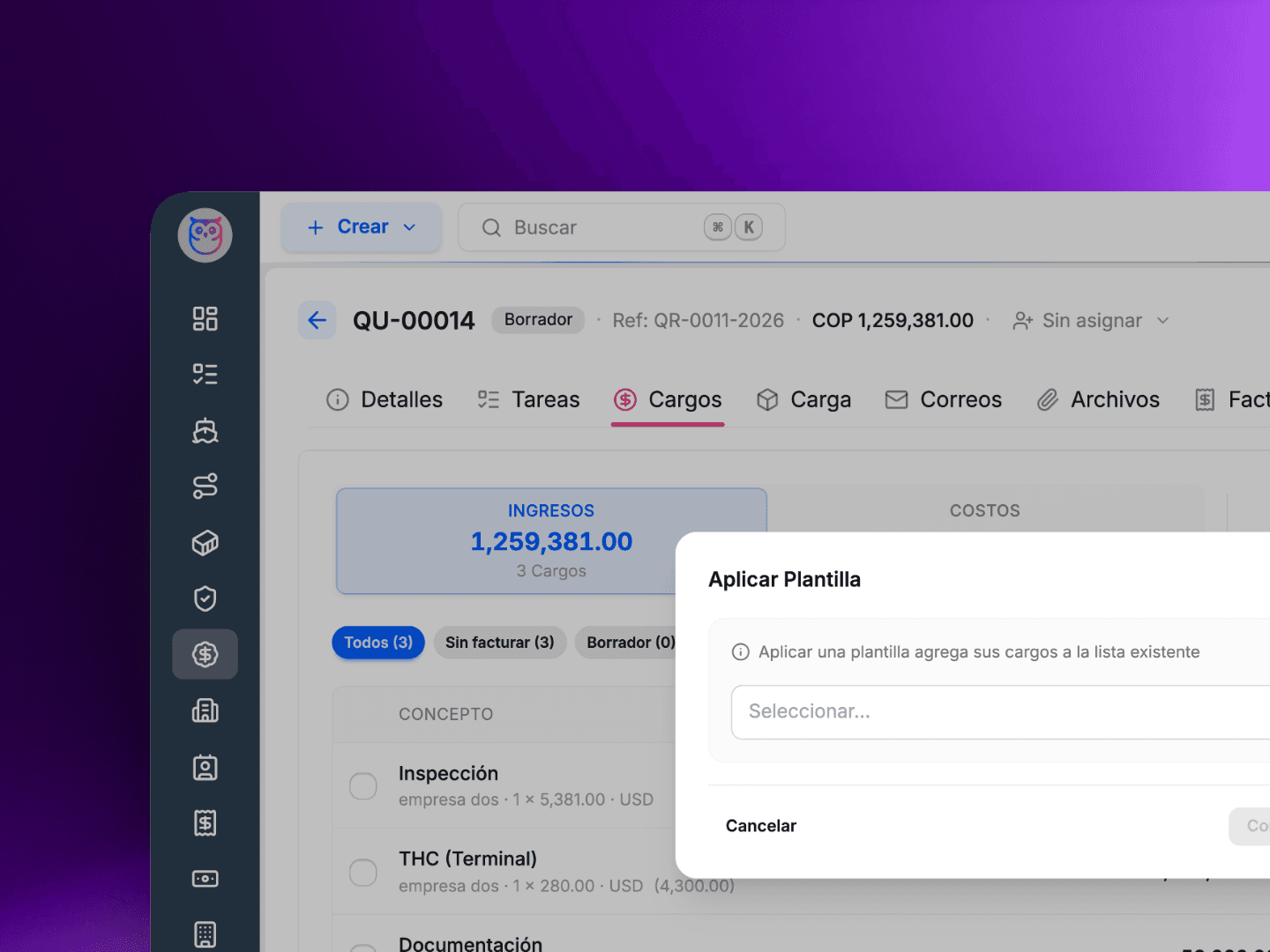
Deja de Re-digitar los Mismos Cargos Una y Otra Vez
Si tu agencia maneja rutas recurrentes o paquetes de servicios estandar, probablemente has digitado el mismo conjunto de cargos decenas de veces. Flete, manejo, documentacion, aduana - las mismas lineas, los mismos montos, las mismas partes. Es tedioso, y es donde se cuelan los errores.
Plantillas de Cargos te permiten definir un conjunto reutilizable de cargos una sola vez y aplicarlos a cualquier envio, oferta o factura con un solo clic.
Como funciona:cum
Ve a la nueva pagina de Plantillas de Cargos y crea una plantilla con tus lineas de cargo estandar - montos, direccion (ventas/costos), y opcionalmente a quien se factura.
Abre cualquier envio, oferta o factura y haz clic en Aplicar Plantilla desde el panel de cargos.
Todas las lineas se agregan al instante. Ajusta si es necesario.
Algunos detalles importantes:
Las plantillas pueden incluir cargos sin una parte facturada especifica. NuevaFlo resolvera la parte correcta automaticamente al aplicar la plantilla segun el contexto de la entidad.
Los cargos BUY tambien son compatibles -- activalo por plantilla cuando tu lado de costos sigue un patron predecible.
Crea tantas plantillas como necesites. Por ruta, por cliente, por tipo de servicio -- lo que se adapte a tu flujo de trabajo.
Menos repeticion, menos errores, respuesta mas rapida. Esa es la idea.
Tambien Corregimos
El boton flotante de acciones ya no se superpone con los controles de cargos en la parte inferior de la pantalla.
Stop Re-entering the Same Charges Over and Over
If your agency handles recurring lanes or standard service packages, you have probably typed the same set of charges dozens of times. Freight, handling, documentation, customs -- the same line items, the same amounts, the same parties. It is tedious, and it is where mistakes creep in.
Charge Templates let you define a reusable set of charges once and apply them to any shipment, quotation, or invoice with a single click.
How it works:
Go to the new Charge Templates page and create a template with your standard charge lines -- amounts, directions (BUY/SELL), and optionally who gets billed.
Open any shipment, quotation, or invoice and click Apply Template from the charges panel.
All charge lines are added instantly. Adjust if needed.
A few details worth knowing:
Templates can include charges without a specific billing party. NuevaFlo will resolve the right party automatically when you apply the template based on the entity context.
BUY charges are supported too -- opt in per template when your cost side follows a predictable pattern.
Build as many templates as you need. Per lane, per client, per service type -- whatever fits your workflow.
Less repetition, fewer errors, faster turnaround. That is the idea.
We Also Fixed
The floating action button no longer overlaps with charge action controls at the bottom of the screen.
Crea Envios desde Documentos en Segundos
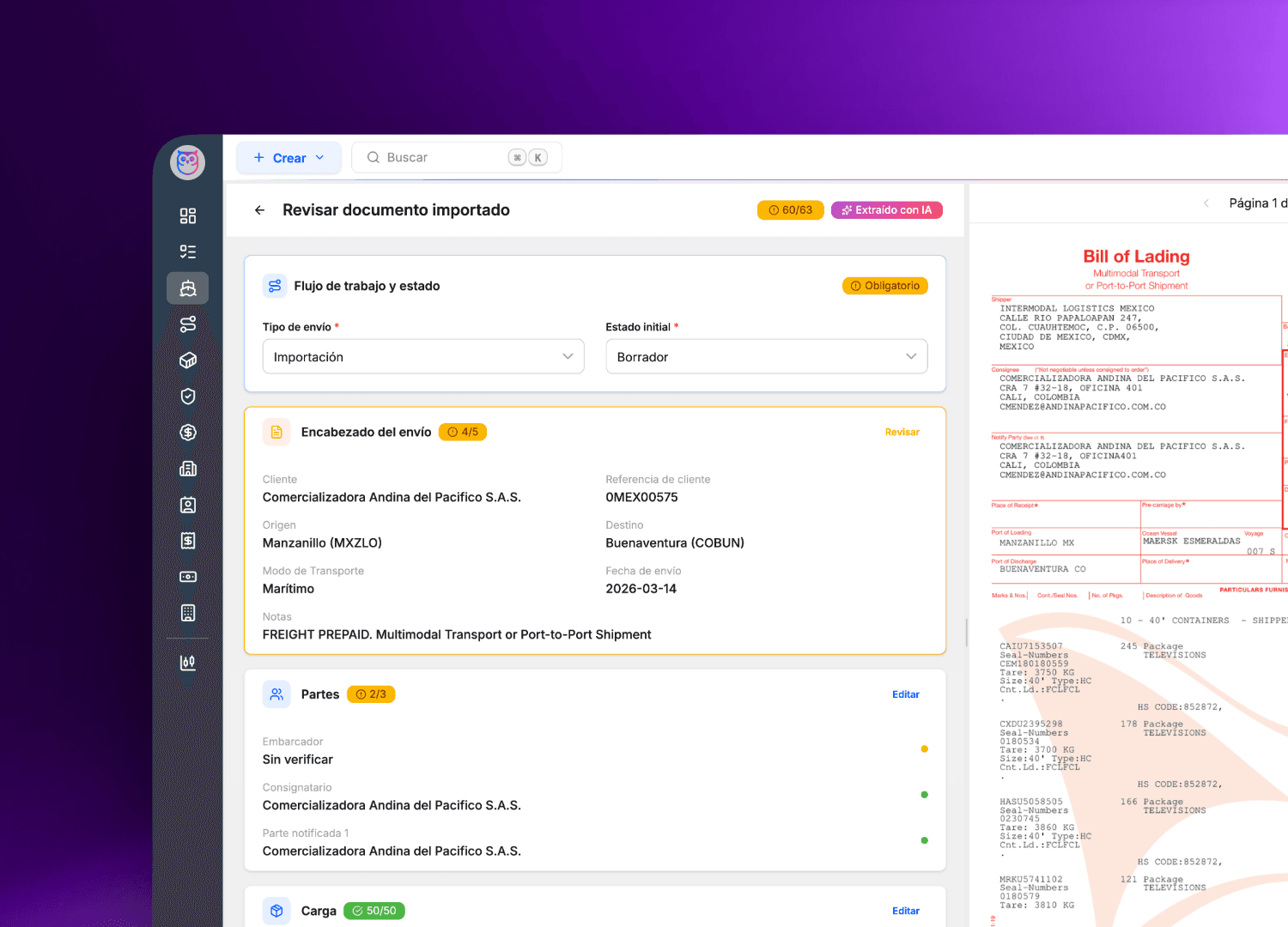
Si alguna vez pasaste tu manana re-digitando datos de un Bill of Lading en tu sistema, conoces el dolor. Un numero de contenedor mal leido, una direccion con errores, un peso que se te paso -- y despues estas corrigiendo en cadena.
Hoy presentamos Documento-a-Envio, una nueva forma de crear envios en NuevaFlo. Sube un documento y nuestra IA hace el resto.
Como funciona:
Sube un PDF o imagen de tu documento de embarque.
NuevaFlo lee el documento y extrae partes, rutas, detalles de carga, referencias y mas.
Un nuevo envio se pre-llena y se presenta para tu revision.
Revisa los datos, haz los ajustes necesarios y aprueba.
Eso es todo. Lo que antes eran minutos de captura manual se convierte en una revision rapida.
Que documentos son compatibles?
Disenamos esto pensando en Bills of Lading, Facturas Comerciales y Packing Lists, pero el sistema hara su mejor esfuerzo con cualquier documento de embarque que subas. Entre mas estructurado el documento, mejores los resultados -- pero te invitamos a probar con cualquier cosa y contarnos como te fue.
Algunos puntos a tener en cuenta:
Siempre revisa el envio pre-llenado antes de aprobar. La IA es rapida, pero tu experiencia es lo que hace que los datos sean confiables.
Documentos escaneados y fotos tambien funcionan, aunque PDFs limpios dan los mejores resultados.
Esto es solo el comienzo. Seguiremos mejorando la precision de la extraccion y agregando soporte para mas tipos de documentos basados en tu feedback.
Creamos NuevaFlo para eliminar el trabajo repetitivo y que puedas enfocarte en lo que importa -- atender a tus clientes y hacer crecer tu negocio. Documento-a-Envio es un gran paso en esa direccion.
Pruebalo hoy y cuentanos que te parece.
Tambien en Esta Version
Funcionalidades
Pagos en facturas -- Ahora puedes registrar pagos contra facturas y hacer seguimiento a saldos pendientes.
Busqueda con acentos -- La busqueda de nombres de empresas ahora funciona sin importar los acentos. "García" y "Garcia" devuelven los mismos resultados.
Cambio de idioma en onboarding -- Cambiar el idioma durante el onboarding ya no reinicia tu progreso.
Correcciones
Buscar un contenedor ahora te lleva al envio correspondiente en lugar de un resultado sin salida.
Los contenedores ahora aparecen en la busqueda general del sistema con mejor coincidencia de referencias.
Las ofertas ahora se asignan automaticamente a su creador.
Las tareas de declaracion ya no se crean despues de que el plazo de presentacion ha pasado.
Los registros archivados ahora se consideran correctamente en las verificaciones de permisos de acceso.
Create Shipments from Documents in Seconds
If you have ever spent your morning re-typing data from a Bill of Lading into your TMS, you know the pain. Misread a container number, fat-finger an address, miss a weight -- and now you are chasing corrections downstream.
Today we are introducing Document-to-Shipment, a new way to create shipments in NuevaFlo. Upload a document, and our AI does the rest.
How it works:
Upload a PDF or image of your shipping document.
NuevaFlo reads the document and extracts parties, routes, cargo details, references, and more.
A new shipment is pre-filled and presented for your review.
Check the data, make any adjustments, and approve.
That is it. What used to be minutes of manual entry becomes a quick review.
Which documents are supported?
We built this with Bills of Lading, Commercial Invoices, and Packing Lists in mind, but the system will do its best with any shipping document you upload. The more structured the document, the better the results -- but we encourage you to try anything and let us know how it goes.
A few things to keep in mind:
Always review the pre-filled shipment before approving. AI is fast, but your expertise is what makes the data trustworthy.
Scanned documents and photos work too, though clean PDFs give the best results.
This is just the beginning. We will keep improving extraction accuracy and adding support for more document types based on your feedback.
We built NuevaFlo to eliminate busywork so you can focus on what matters -- serving your clients and growing your business. Document-to-Shipment is a big step in that direction.
Try it today and let us know what you think.
Also in This Release
Features
Invoice payments -- You can now register payments against invoices and track outstanding balances.
Accented search -- Searching for company names now works regardless of accents. "García" and "Garcia" return the same results.
Onboarding language switch -- Changing your language during onboarding no longer resets your progress.
Fixes
Searching for a container now navigates you to its parent shipment instead of a dead end.
Containers now appear in site-wide search results with improved reference matching.
Quotations are now automatically assigned to their creator.
Declaration tasks are no longer created after the filing deadline has passed.
Archived records are now properly considered in access permission checks.
Dashboard Personal
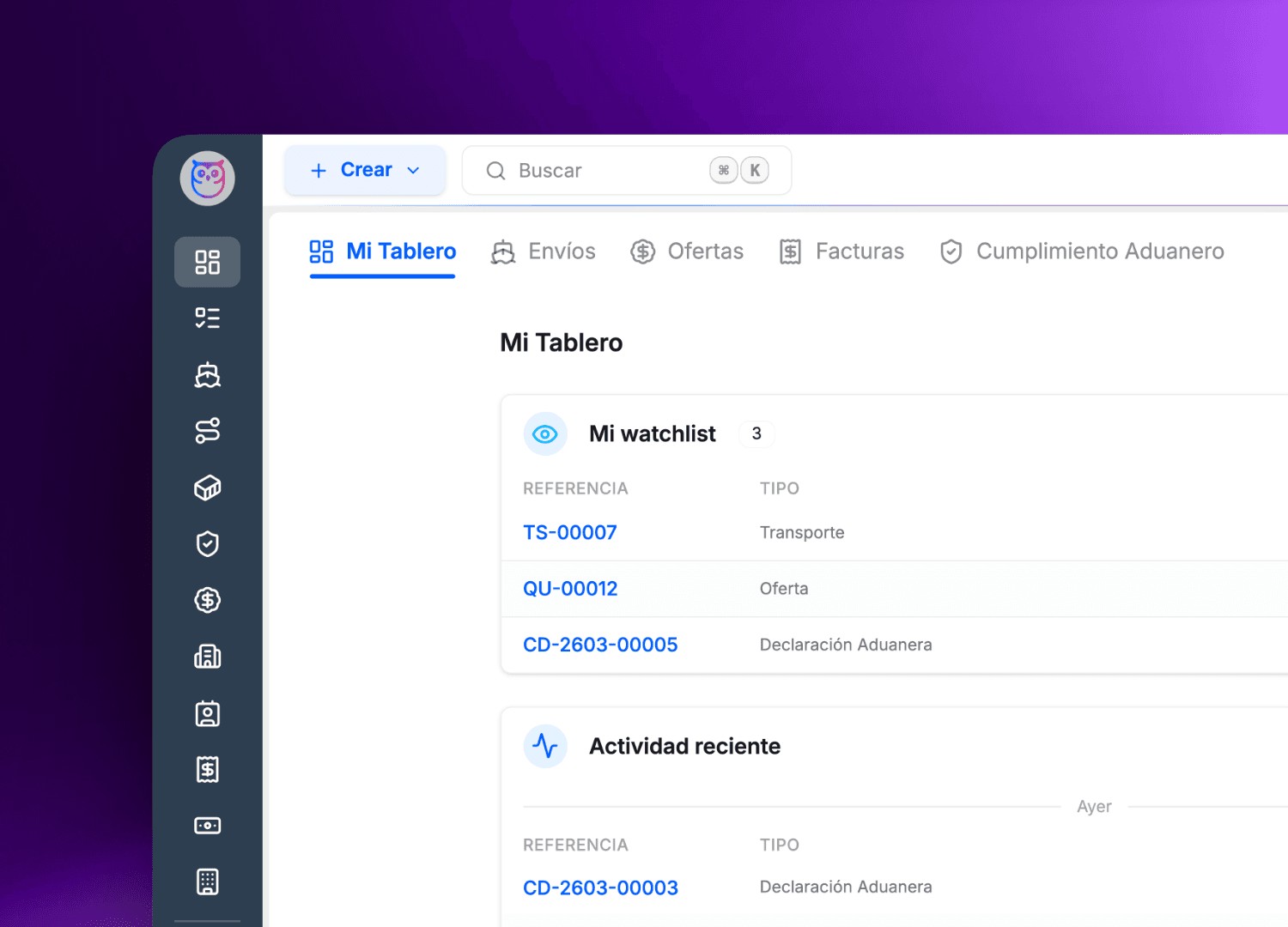
Tu Dashboard Personal
NuevaFlo ahora te recibe con una pantalla de inicio personalizada. Ve tu actividad reciente, asignaciones actuales y elementos en seguimiento en un solo lugar. Tambien integramos gestion de tareas directamente en el dashboard, para que puedas organizar tus pendientes sin salir de la plataforma.
Analitica Avanzada con Dashboards Integrados
Obtiene mayor visibilidad sobre tus operaciones con dashboards de analitica integrados impulsados por Metabase. Explora tus datos con graficos interactivos y filtros directamente dentro de NuevaFlo.
Experiencia Mejorada
Ahora puedes archivar ofertas en lugar de perderlas para siempre. El borrado suave mantiene tus datos ordenados y te permite recuperar ofertas cuando lo necesites.
Las vistas de listado ahora muestran marcas de tiempo relativas localizadas ("hace 2 horas", "3 days ago") para que siempre sepas que tan recientes son tus datos.
Todos los registros ahora rastrean quien los modifico por ultima vez para mejor trazabilidad del equipo.
Your Personal Dashboard
NuevaFlo now greets you with a personalized home screen. See your recent activity, current assignments, and watchlisted items all in one place. We also built task management right into the dashboard, so you can track your to-dos without leaving the platform.
Advanced Analytics with Embedded Dashboards
Gain deeper visibility into your operations with embedded analytics dashboards powered by Metabase. Explore your data with interactive charts and filters directly inside NuevaFlo.
Improved Experience
You can now archive quotations instead of losing them forever. Soft-delete keeps your data clean while letting you recover ofertas when needed.
List views now show localized relative timestamps ("hace 2 horas", "3 days ago") so you always know how fresh your data is.
All records now track who last modified them for better team accountability.
Mejoras en Gestion de Cargos y en el Diseñador de Documentos | Clearer Charge Management and Document Designer Upgrades
Gestion de Cargos Mas Clara
La direccion BUY/SELL en los cargos ahora se controla con un toggle visible y explicito. Ya no hay ambiguedad sobre que lado de la transaccion estas editando.
Mejoras en el Diseñador de Documentos
Ahora puedes subir tu propio layout PDF como plantilla base en el Disenador de Documentos y revertir al diseno predeterminado en cualquier momento. Ideal para documentos con tu marca como House Bills o facturas comerciales.
Experiencia Mejorada
Las ofertas y envios ahora incluyen Incoterms, Modo de Transporte, filtros rapidos, un selector de empaque simplificado y exportacion a PDF desde el detalle de la oferta.
Controles de paginacion renovados en toda la plataforma.
Paginas de error mas claras cuando algo sale mal.
Lenguaje armonizado en toda la interfaz y requisitos de contrasena traducidos para soporte bilingue completo.
Clearer Charge Management
The BUY/SELL direction on charges is now an explicit, visible toggle. No more guessing which side of the transaction you are editing.
Document Designer Upgrades
You can now upload your own PDF layout as a base template in the Document Designer and revert to the default at any time. Great for branded documents like House Bills or commercial invoices.
Improved Experience
Quotations and shipments now include Incoterms, Transport Mode, quick filters, a streamlined package type selector, and PDF export from the detail view.
Refreshed pagination controls across the platform.
Clearer error pages when something goes wrong.
Harmonized language throughout the UI and translated password requirements for full bilingual support.
Interfaz Más Limpia en Pantallas Principales | Cleaner UI Across Core Screens
Las pantallas de lista y detalle de envíos, ofertas, facturas y más tienen un diseño renovado. Menos densidad, más espacio para respirar y una jerarquía visual más clara. La misma información, pero organizada para que trabajes con menos ruido.
The list and detail screens for shipments, quotations, invoices, and more have a refreshed layout. Less density, more breathing room, and a clearer visual hierarchy. The same information, just organized so you can work with less noise.
Asignación de Responsable en Entidades Principales | Primary Assignee on Core Entities
Cada envío, oferta, factura y declaración aduanera ahora tiene un responsable asignado. Al crear un registro, el sistema te asigna automáticamente. Si el trabajo cambia de manos, puedes reasignar en cualquier momento. Las notificaciones y el seguimiento ahora van a la persona correcta, no solo a quien creó el registro.
Every shipment, quotation, invoice, and customs declaration now has an assigned owner. When you create a record, the system automatically assigns you. If the work changes hands, you can reassign at any time. Notifications and follow-ups now go to the right person, not just whoever created the record.
Tablero Kanban y Grupos de Estado | Kanban Board & Status Groups
Visualiza tus envíos en un tablero Kanban organizado por grupos de estado. Cada estado ahora pertenece a un grupo que define su columna en el tablero. Arrastra envíos entre columnas para actualizar su estado. Las fases canónicas opcionales permiten automatizaciones futuras como barras de progreso en el portal de tracking y reportes entre cuentas.
View your shipments on a Kanban board organized by status groups. Each status now belongs to a group that defines its column on the board. Drag shipments between columns to update their status. Optional canonical phases enable future automations like tracking portal progress bars and cross-tenant analytics.
Rediseño de Páginas de Autenticación | Auth Pages Redesign
Las páginas de inicio de sesión, registro y recuperación de contraseña tienen un diseño completamente nuevo. Más limpias, más rápidas y consistentes con la identidad visual de NuevaFlo. La experiencia de acceso ahora se siente parte de la plataforma desde el primer momento.
The login, signup, and password recovery pages have been completely redesigned. Cleaner, faster, and consistent with the NuevaFlo visual identity. The access experience now feels like part of the platform from the very first moment.